Zero-Subscription Smart Lighting: a C$19 Zigbee dimmer that talks to Google & Alexa

I put a cheap 1-channel dimmer behind a dumb wall switch in my son's room and asked a simple question: can I control it by voice — through both assistants — without paying anyone a monthly fee? The answer is yes. Here is everything it actually took.
$0 / month · Home Assistant · ZHA · OpenTofu · Cloudflare Tunnel · Watch the 60-second demo
The C$19 starting point
It started with a small box of electronics and a dumb light switch.
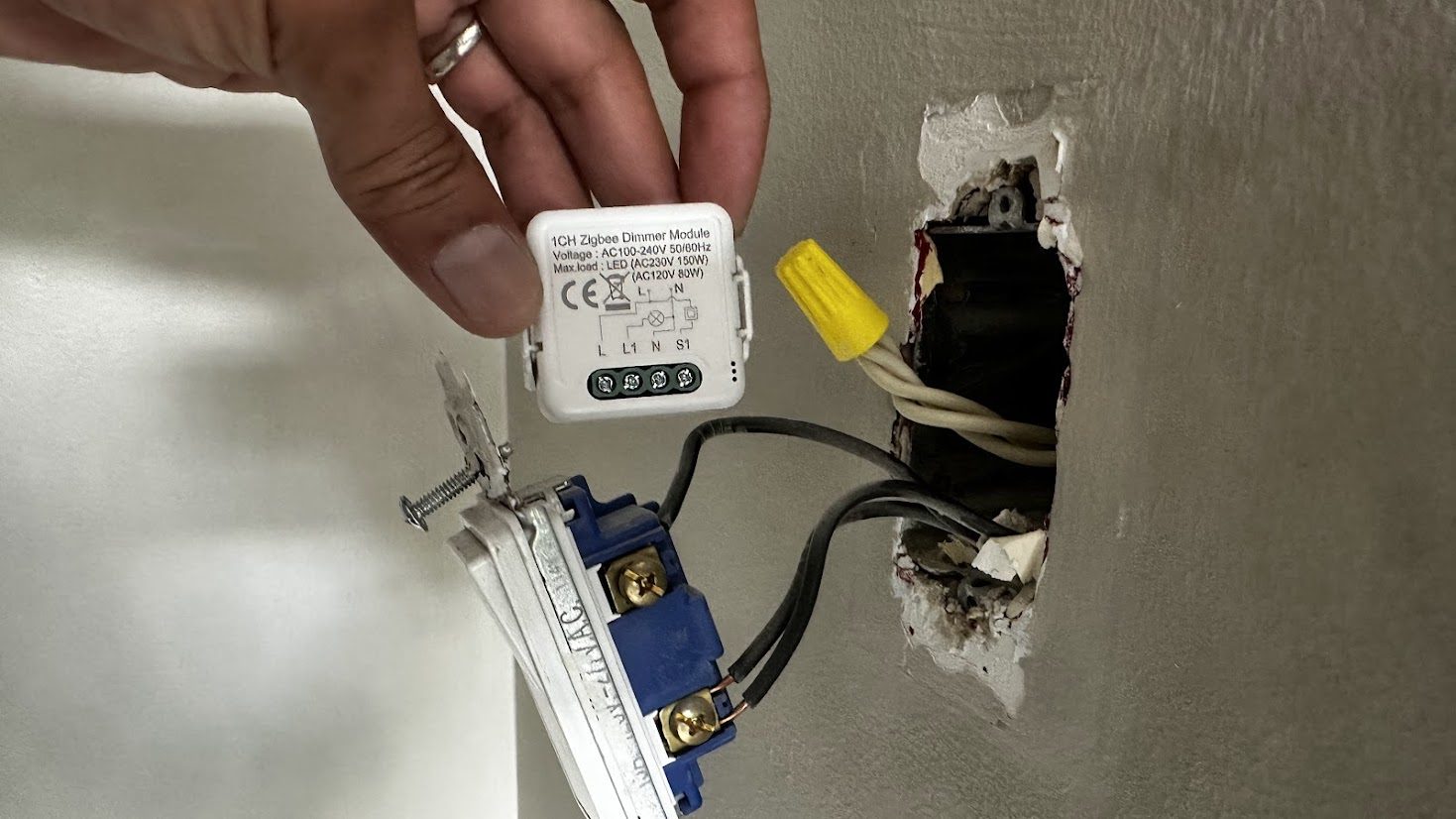
The whole build, in one hand. A ~C$19 1-channel Zigbee dimmer module — note the L / L1 / N / S1 terminals — going in behind an ordinary wall switch. That S1 (“switch”) input is the one that becomes the hero of Act III.
I'd just wired a 1-channel Tuya Zigbee dimmer module into the wall of my son's bedroom — the kind of tiny relay-sized brick that hides in the back box behind an existing switch and makes a "dumb" fixture smart without changing the fixture. Mine sits behind a normal latching rocker (the everyday kind that physically stays up or down), with the rocker wired to the module's external-switch input and constant mains power feeding the module itself. Remember that wiring detail — it becomes the climax of the story.
The goal was deliberately ordinary: "Hey Google, set the light to 40%" and "Alexa, set the light to 40%." Both assistants. From a switch I already own, a hub I already run, and speakers already on the shelf. The one rule: no new monthly subscription.
That last rule is the whole point of this post. The smart-home industry would love for "works with Google and Alexa" to mean "pay us $X a month forever." It doesn't have to. But the free path is undocumented, sharp-edged, and — as I found out — occasionally a flat-out lie in the official docs. So here is the real map.
The ground rules: local-first, $0/month
Home Assistant has an official cloud — Nabu Casa — and it's genuinely excellent. For ~$6.50/month it gives you remote access plus one-toggle Alexa and Google integration. If you value your weekend, pay for it. This post is for the other kind of person: the one who wants to understand the machine and owns the result outright.
"Free" here isn't a trick. It rests on five things that are genuinely free or already-owned:
- The Zigbee radio is local. The dimmer talks to my hub directly. No device cloud, no per-device account.
- Alexa runs entirely on the LAN via Home Assistant's
emulated_hue— Alexa thinks it found a Philips Hue bridge. Nothing leaves the house. - Google's "cloud-to-cloud" smart-home integration is free, and the only Google Cloud piece it needs (the HomeGraph API) requires no billing account.
- A Cloudflare Tunnel gives Google's servers a public HTTPS path back to my hub — on Cloudflare's free tier, with a domain I already owned.
- Home Assistant itself is self-hosted and free.
Add it up and the recurring cost is $0/month. The only money that changed hands was the dimmer module. We'll itemize the whole bill at the end.
Foundation: Home Assistant + ZHA
The hub is a self-hosted Home Assistant instance. For Zigbee it uses ZHA — the built-in, fully-local Zigbee stack (powered by the zigpy library). No vendor bridge, no cloud relay; the coordinator radio and Home Assistant do all the work on my own network.
One wrinkle worth calling out because it shapes everything later: my Home Assistant runs inside a virtual machine with no USB passthrough, so the Zigbee coordinator isn't a USB stick — it's a network-attached (Ethernet/IP) coordinator. That's a perfectly good setup, but it means the radio lives elsewhere on the LAN, and "is the device reachable?" becomes a question with more than one answer. (Foreshadowing.)
Pairing the dimmer was the easy part: put ZHA into join mode, power the module, and it shows up. And that's where the trouble started — because "shows up" and "works" are very different things.
Act I — "Why won't it dim?"
Freshly paired, the dimmer exposed exactly three entities: a light, an "identify" button, and a firmware-update entity. No min/max brightness controls, no configuration. I flipped the light on — fine. I set it to 30% — and the slider snapped back to a sliver of light a half-second later, while the bulb did absolutely nothing. Set 50%: the UI showed 50, then reverted to 3. Physically, nothing.
That "reverts to 3" behavior is a tell. Home Assistant optimistically shows the level you asked for, then reads the device back and corrects itself. If it keeps reverting to a stuck value while the bulb never moves, it means the command Home Assistant is sending is being silently ignored by the device.
The device speaks a dialect
Standard Zigbee dimming uses the Level Control cluster's CurrentLevel attribute and a MoveToLevel command. This particular module — a Tuya TS110E, manufacturer code _TZ3210_k1msuvg6 — does not. It reports its brightness on a manufacturer-specific attribute, 0xF000 (on a 10–1000 scale), and it only obeys a custom "move to level" command, 0x00F0. Send it a textbook MoveToLevel and it just... shrugs.
Home Assistant's fix for "this device speaks a dialect" is a quirk — a small Python class (a "zigpy quirk") that teaches the stack how to translate. And there is an upstream quirk for the TS110E. The catch: its device signature only matches a sibling manufacturer code, _TZ3210_ngqk6jia. That sibling advertises a slightly different set of Zigbee clusters than mine does. The old-style ("v1") quirks match on the device's exact cluster fingerprint — so on my _TZ3210_k1msuvg6, nothing matched, no quirk loaded, and dimming was broken out of the box.
This is where the build forked into two. One agent owned the voice + cloud + infrastructure track; a second agent went down a rabbit hole reverse-engineering the dimmer's protocol from the Zigbee2MQTT converter source and the zigpy internals, line by line, to confirm the exact attribute, command, and scaling before writing a single line of quirk. More on that collaboration in §10.
The fix: a modern (v2) quirk that matches by name, not fingerprint
Instead of fighting the fingerprint mismatch, the answer was a quirks-v2 QuirkBuilder. v2 quirks match on manufacturer + model — not the brittle full cluster signature — so adding my exact device is a one-liner. The quirk .replaces() the Level Control cluster with a subclass that (a) translates standard dim commands into the device's 0x00F0 command, and (b) remaps the 0xF000 brightness reports back onto the standard attribute so Home Assistant's slider tracks reality.
class TS110ELevelControl(CustomCluster, LevelControl):
    class ServerCommandDefs(LevelControl.ServerCommandDefs):
        # the device's private "move to level" command
        moveToLevelTuya = foundation.ZCLCommandDef(
            id=0x00F0, schema={"payload": TuyaLevelPayload},
            is_manufacturer_specific=False,
        )

    def _update_attribute(self, attrid, value):
        # 0xF000 reports come in on a 10..1000 scale; map to 0..254 CurrentLevel
        if attrid == 0xF000:
            value = (value + 4 - 10) * 254 // (1000 - 10)
            attrid = 0x0000
        super()._update_attribute(attrid, value)

    async def command(self, command_id, *args, **kwargs):
        # intercept MoveToLevel / Move / MoveToLevelWithOnOff and re-send as 0x00F0
        if command_id in (0x0000, 0x0001, 0x0004):
            level = kwargs.get("level", args[0] if args else 0)
            brightness = level * (1000 - 10) // 254 + 10
            return await super().command(
                0x00F0, TuyaLevelPayload(level=brightness, transtime=0),
                **kwargs,
            )
        return await super().command(command_id, *args, **kwargs)
Drop the file into Home Assistant's custom-quirks folder, point the zha integration's custom_quirks_path at it, restart, and re-interview the device. Home Assistant now reports quirk_applied: true. The full quirk is in the appendix.
Before writing a quirk, check whether your exact manufacturer string is in an upstream quirk's signature — not just the model number. Tuya ships dozens of near-identical variants under one model (TS110E) with different _TZ3210_* codes and subtly different cluster lists. "Same model" is not "same device."
Act II — the red herring (NWK_NO_ROUTE)
Quirk deployed, Core restarted, confidence high. I called the light service again — and got an exception:
zigpy.exceptions.DeliveryError: Failed to send request:
<Status.NWK_NO_ROUTE: 205>
Every command failed the same way. The device showed available: true but its "last seen" was four hours stale, and its link-quality (LQI) had sagged to ~31 and then to 0. NWK_NO_ROUTE means the coordinator literally has no route through the mesh to the device. The dimmer had silently fallen off the Zigbee network.
For a while this looked like a quirk bug — the timing was suspicious, the quirk was new, surely we broke it. We had not. This was the oldest lesson in home automation wearing a new mask: it's not always software. The fix was embarrassingly physical — power-cycle the module, let it rejoin the mesh. (A re-pair keeps the same device address, so nothing downstream — entity names, the quirk, automations — has to change.) The moment it rejoined, the quirk auto-applied and the light dimmed smoothly for the first time.
This was also the moment of peak paranoia: with two agents touching the same system, I genuinely suspected the other session had broken the device. It hadn't laid a finger on it — but it had already worked out the exact failure mode from the diagnostics and could say so with receipts. Cross-checking each other's assumptions turned out to be one of the quietly valuable things about building this way.
Weak LQI is a time bomb. This dimmer sat at the far edge of the mesh; the dropout was a symptom. The durable fix is a mains-powered Zigbee repeater (a smart plug or bulb that routes) between the coordinator and the room. ZHA also exposes a per-device LQI sensor — graph it, and alert when it falls below ~20, so the next dropout announces itself instead of looking like a software bug.
Act III — making the wall switch behave (momentary → toggle)
Brightness worked over Wi-Fi voice. But the physical switch was possessed. Set the light to 50% from my phone and it would slowly ramp down to nothing on its own. Flip the wall rocker and the light shot to 100% and stayed there, ignoring everything else. Voice commands were being steamrolled by the wall.
Here's the cause, and it's a beautiful little impedance mismatch between hardware and firmware. The dimmer's external-switch input has a configurable switch type, and it shipped in Momentary mode — the mode meant for a spring-return push-button (push = a brief pulse). But my wall switch is a latching rocker: when you flip it, it stays closed. The firmware reads that held-closed contact as a button being held down, which triggers the dimmer's "hold to dim" ramp — forever. Every voice command got overridden by what the firmware thought was a finger mashing the button.
The fix is to tell the module the switch is a latching one. That setting lives in a manufacturer attribute, 0xFC02, on the Level Control cluster, with three values:
- Momentary (0) — for spring-return push-buttons. (The broken default.)
- Toggle (1) — every flip of the rocker toggles the light on/off.
- State (2) — the light mirrors the rocker's physical position (up = on, down = off).
One byte, one very specific byte
I added 0xFC02 to the quirk and exposed it as a dropdown ("select") entity, then set it to Toggle. The write came back rejected:
Failed to write attribute switch_type=<SwitchType.Toggle: 1>:
<Status.INVALID_DATA_TYPE: 141>
This one is subtle and worth internalizing, because it bites anyone hand-rolling Tuya attributes. When you declare a Zigbee attribute's type, zigpy derives the on-the-wire ZCL data-type tag from it. I had declared the attribute as an enum, which serializes with the enum8 tag (0x30). But this firmware insists the value arrive tagged as a plain unsigned 8-bit integer (uint8, 0x20). Same byte value, different type tag — and the device hard-rejects the mismatch with INVALID_DATA_TYPE.
The fix is a one-line change: declare the attribute as t.uint8_t so the write goes out tagged 0x20, and let the dropdown carry the friendly enum labels. Home Assistant's select entity maps labels to integers on its own; the stored type only governs how the bytes hit the wire.
class SwitchType(t.enum8):
    Momentary = 0x00
    Toggle    = 0x01
    State     = 0x02

# on the cluster: declare as uint8 so the write is tagged 0x20, NOT enum8/0x30
switch_type = ZCLAttributeDef(
    id=0xFC02, type=t.uint8_t, is_manufacturer_specific=False,
)

# expose a dropdown; the enum supplies the labels, independent of storage type
(QuirkBuilder("_TZ3210_k1msuvg6", "TS110E")
    .replaces(TS110ELevelControl)
    .enum("switch_type", SwitchType, LevelControl.cluster_id,
          translation_key="switch_type", fallback_name="Switch type")
    .add_to_registry())
Set it to Toggle, and the wall switch finally behaved: a flip toggles the light, voice sets the brightness, and the two stop fighting. As a bonus, the experiment proved the wiring was right all along — the module kept its mains power and stayed on the mesh regardless of the rocker's position, which is exactly what you want from a switch wired to the dedicated input rather than cutting the module's supply.
"All along" is doing some work in that sentence, though — because the first time, I wired it wrong.
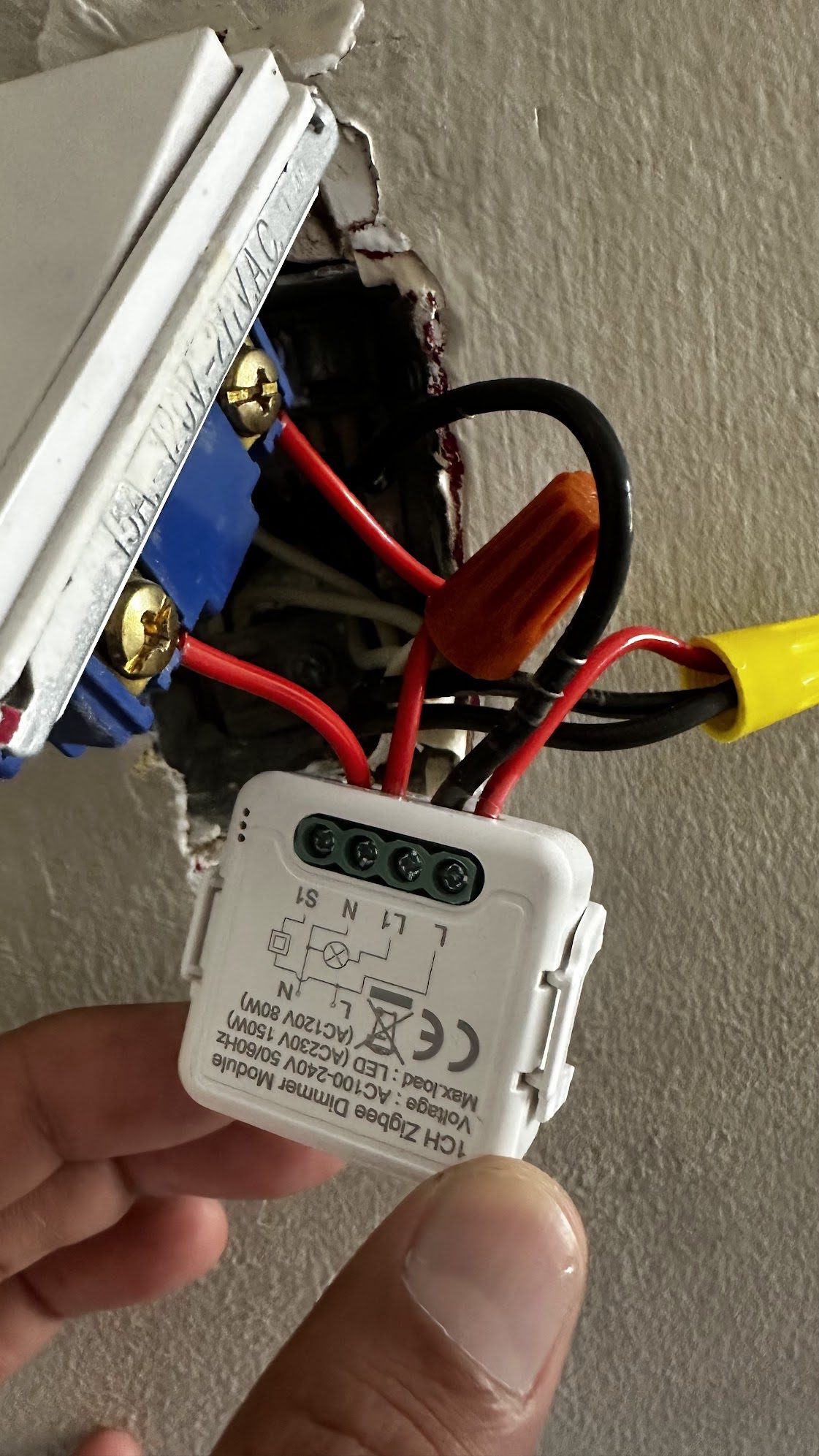
The confession. On the first pass I cabled the wall switch to neutral instead of live — I'd misread the module's tiny printed wiring diagram and missed the live junction feeding the switch. The S1 input has to sense the live, so the switch did precisely nothing until I moved that wire over. Read the 4-point-font diagram twice — and cut the breaker whenever you're in the box.
If, instead, your module drops off the network whenever the wall switch is "off," the switch is cutting the module's power — it's wired in the supply line, not the dedicated switch input. No amount of "switch type" config can fix that; it needs rewiring (constant power to the module, switch to the input terminal). A smart dimmer needs to stay powered to listen.
For a latching rocker, State mode (light mirrors switch position) is often the most intuitive choice — it behaves like a normal dumb switch but stays smart-controllable. Toggle is better suited to momentary push-buttons. Both are non-destructive; flip the dropdown and try each.
Voice, Part 1 — Alexa for free (emulated_hue)
With Home Assistant finally in full control of the dimmer, the voice layer was almost anticlimactic — at least for Alexa.
Amazon Echo devices have known how to discover and control Philips Hue v1 bridges on the local network for a decade. Home Assistant's emulated_hue integration impersonates exactly that bridge: it answers Hue's discovery and control endpoints on the LAN and maps the "lights" to whatever Home Assistant entities you choose. The Echo never knows it's talking to Home Assistant, and nothing touches the cloud.
emulated_hue:
  host_ip: 192.168.1.50      # your HA box's static LAN IP (Echo caches it)
  listen_port: 80            # current Echo firmware requires port 80
  expose_by_default: false
  exposed_domains: [light]
  entities:
    light.your_dimmer:
      name: "Kids Room Light"   # what you'll say to Alexa
Restart, say "Alexa, discover devices," and "Alexa, set Kids Room Light to 50%" just works — brightness and all, completely locally.
Two non-obvious requirements: the Echo must be on the same subnet as Home Assistant (discovery uses local multicast), and the integration must listen on port 80 — newer Echo firmware stopped honoring the old alternate port. emulated_hue is also Alexa-only; Google dropped support for the fake-Hue path years ago. Which is the entire reason Part 2 exists.
Voice, Part 2 — Google for free (the hard one)
Google is where "free" gets earned. There's no local shortcut like emulated_hue; Google's Assistant lives in Google's cloud, and to control a local light it has to make an HTTPS call back into your house. Doing that without Nabu Casa means assembling four pieces yourself.
Piece 1 — Home Assistant is its own OAuth server
This is the single most misunderstood part, and the official-feeling write-ups (including a first draft of this very project — see §10) get it wrong. In Google's free "cloud-to-cloud" integration, Home Assistant itself is the OAuth 2.0 authorization server. It exposes /auth/authorize and /auth/token, and Google is the client.
That means you do not create a Google Cloud OAuth consent screen, and you do not create an OAuth "client" credential in Google Cloud. The "Client ID" you type into Google's linking form is — bizarrely — Google's own redirect URL, with your project id on the end. The "Client secret" can be any string; Home Assistant never checks it.
Piece 2 — a free public HTTPS path: Cloudflare Tunnel
Google's servers need to reach https://ha.example.com/api/google_assistant. Rather than open a port on my router, I used a Cloudflare Tunnel: a lightweight connector (a Home Assistant add-on) dials out to Cloudflare and holds the connection open, and Cloudflare proxies inbound HTTPS down that tunnel. No inbound firewall holes, TLS terminated at Cloudflare's edge, and on a domain I already owned it costs nothing. A short DNS record (ha.example.com → the tunnel) and a "trust the proxy" line in Home Assistant, and the hub is reachable from Google's cloud and nowhere dangerous.
Piece 3 — the one Google Cloud bit: HomeGraph (free)
The only Google Cloud work is enabling the HomeGraph API and creating a service account + key so Home Assistant can push state changes back to Google ("report state"). HomeGraph needs no billing account — it's free. The service-account JSON goes on the hub; that's it for Google Cloud.
Piece 4 — the Home Assistant config
google_assistant:
  project_id: !secret ga_project_id
  service_account: !include ../google_service_account.json
  report_state: true      # push state to Google via HomeGraph
  expose_by_default: false
  entity_config:
    light.your_dimmer:
      name: "Kids Room Light"
      expose: true
Then the manual console steps: in the Google Home Developer Console, create a cloud-to-cloud integration, point its fulfillment URL at https://ha.example.com/api/google_assistant, and fill the account-linking form:
| Field | Value |
|---|---|
| Linking type | OAuth · Authorization Code |
| Client ID | https://oauth-redirect.googleusercontent.com/r/<gcp-project-id> (yes, you type Google's own redirect URL) |
| Client secret | any string — Home Assistant ignores it |
| Authorization URL | https://ha.example.com/auth/authorize |
| Token URL | https://ha.example.com/auth/token |
| Scopes | email and name (two entries) |
Enable testing, and a [test] entry appears in the Google Home app; link it with the same Google account and "Kids Room Light" shows up. "Hey Google, set Kids Room Light to 30%" — done. No production deployment, no Google verification review, no monthly fee.
Turn off Cloudflare's "Bot Fight Mode." It challenges traffic from Google's server IP range (ASN 15169), and those challenges cannot be skipped with a WAF rule. With it on, Google's link/sync calls hit a Cloudflare challenge page instead of your hub and the integration silently fails. Also keep Security Level off "I'm Under Attack" and put no Cloudflare Access/Zero-Trust app in front of the hub's /auth/* and /api/google_assistant paths.
Manual Google account-linking has been flaky in 2026 (tracked as an open Home Assistant core issue): some users hit "Could not reach [test] …" at the final step. The root cause is disputed and there's no guaranteed fix. Mine linked fine. If yours doesn't, that's the known issue — not your config — and the reliable fallback for Google specifically is Nabu Casa. (Alexa is unaffected.)
Two smaller traps: the Google console wouldn't import my existing Cloud project until I gave it a unique display name (the project id stays the same — that's what everything keys on); and the cloud-to-cloud wizard demands a 144×144 icon before it'll save. Have a PNG ready.
Piece 5 — close the door: lock the tunnel to Google-only
Here's the objection you should be shouting by now: I just put Home Assistant — admin UI, REST API, all of it — on the public internet behind a single login page. Correct. And the obvious fix — "just put a Cloudflare Access policy in front of it" — is the one move this setup rules out: a managed challenge would also challenge Google's own server-to-server callbacks, which have no browser to solve it. So the lockdown has to block, never challenge.
Two layers, both of which Google's requests sail straight through:
- Scope the tunnel itself. The Cloudflare Tunnel started out forwarding the whole host. Narrow its ingress rules so only the two paths Google needs in steady state —
/api/google_assistant(fulfillment) and/auth/token(token refresh) — reach Home Assistant; everything else404s at the connector, before it's ever Home Assistant's problem. (report_stateis outbound, so it needs no inbound rule;/auth/authorizeis only used during interactive re-linking — see below.) - Block at the edge. Add one Cloudflare WAF custom rule that blocks every request to the host except those two paths arriving from Google's network (
AS15169). Because it's a hard block and not a managed challenge, it doesn't trip Google's callbacks — the same root cause as the Bot-Fight-Mode gotcha above, turned to our advantage.
The measured result: from any non-Google IP, every path returns 403 — the admin UI is simply off the public internet. Only Google's fulfillment reaches the hub, and only from Google's own network. The LAN address and the local Alexa path are untouched, and "Hey Google" keeps working. For good measure, Home Assistant's own ip_ban_enabled plus a login_attempts_threshold of 5 backstop the login page itself.
Two real constraints surface here, both very on-brand for a $0/month build. Cloudflare's free plan caps custom WAF rules at 5 per zone — if the zone is already full, you have to free a slot. And this is the one piece that can't be pure infrastructure-as-code: Cloudflare allows only one custom-rules ruleset per zone and it's shared across everything on that domain, so the WAF rule is applied through the API and documented, while the tunnel-ingress half stays in OpenTofu.
Two operational notes. When you re-link in the Google Home app, temporarily re-open /auth/authorize (plus the login flow and its assets) — the steady-state lockdown blocks the interactive consent screen. And if Google ever moves off AS15169 and voice suddenly breaks, drop the ASN clause for a path-only lockdown (any source, but still only the two Google paths) until you confirm the new range.
Engineering it like infrastructure
I could have clicked all of this together once and prayed I never had to rebuild it. Instead, the cloud-side pieces are captured as infrastructure-as-code with OpenTofu (the open-source Terraform fork): the HomeGraph API enablement, the service account + key + IAM, and the entire Cloudflare Tunnel — named tunnel, ingress rules, and the proxied DNS record. A clean rebuild is one command.
The fun part: the OpenTofu state is AES-GCM encrypted and committed straight to the (private) git repo. OpenTofu's native state encryption means the only thing that can't live in git is the passphrase — and the config enforces encryption, so the tool physically refuses to write plaintext state. The Home Assistant YAML lives in the same repo and is pushed to the box by a small deploy script over SSH.
A few things that cost real time: /config is root-owned but the SSH user isn't, so writes go through sudo tee. The ha CLI has no supervisor token in a plain SSH session, so config-check and restart go through the REST API with a long-lived token instead — and the restart call returns a 504 because the server drops the connection as it restarts (success is confirmed by the box answering 200 again ~3 minutes later, not by the call's status code). And yes: a Core restart on this box takes over three minutes. Every config change was a coffee break.
A .gitignore bug nearly committed a real secret file: inline # comments on a pattern line are treated as part of the pattern, so the rule silently didn't match. Always git status before your first commit and confirm the secret files are actually ignored. (And if a secret ever transits a channel in plaintext — rotate it. Cheap insurance.)
Built by three AI agents in a trench
A confession that's been threaded through this whole post: I didn't build this alone, and not entirely by hand. It was built by three AI coding agents collaborating in real time over a small LAN "session registry" that let them message each other — two through the thick of it and a third for the hardening at the end — plus a human (me) making the calls, holding the credentials, and flipping the physical switch.
The division of labor emerged naturally. One agent owned the voice + cloud + infrastructure track: the OpenTofu, the Cloudflare Tunnel, the Google console, the box access. The other went deep on the dimmer's Zigbee protocol: reading converter source and zigpy internals to pin down 0xF000, 0x00F0, and the uint8-vs-enum8 wire-type bug. When the dimmer fell off the mesh, the infrastructure agent had the symptom and the protocol agent had the diagnosis; they reconciled over the channel before anyone touched the box. A third agent arrived later for the part everyone is tempted to skip — security — and built the lockdown from Piece 5: scoping the tunnel down to Google's two paths and writing the block-everything-but-Google WAF rule.
Two moments earned their keep:
- Trust, but verify your own first draft. A verification pass — a swarm of subagents auditing the plan before go-live — caught that the original Google setup instructions were partly fabricated: they described a GCP OAuth consent screen and client that don't exist in this flow (Home Assistant is the OAuth server — see §8). It also surfaced the Bot Fight Mode trap and the linking-flake issue before they could waste a day. The confident first draft was wrong; the adversarial second pass saved the build.
- Use the boring, reliable interface. The headed browser used to click through the Google console hung mid-project. The pivot — driving Home Assistant's WebSocket API directly with a long-lived token from a tiny script — turned out far more reliable, and its system-log endpoint handed over the exact tracebacks (
NWK_NO_ROUTE,INVALID_DATA_TYPE) that cracked both bugs.
The most human moment: at one point I asked one agent to investigate why the dimmer broke, half-suspecting the other agent had caused it. It hadn't — and it could prove it, because it had been reading the diagnostics the whole time. Three narrow specialists, one shared bus, and a human keeping them honest. That's the shape of the thing.
The bill: $0/month
Here's the whole ledger. The recurring column is the point.
| Component | One-time | Recurring | Notes |
|---|---|---|---|
| Tuya TS110E 1-channel Zigbee dimmer | C$19.08 | $0 | The only new spend. |
| Zigbee coordinator | already owned | $0 | Network-attached radio on the LAN. |
| Echo / Google speakers | already owned | $0 | The voice front-ends. |
| Home Assistant | — | $0 | Self-hosted, open source. |
Alexa via emulated_hue | — | $0 | 100% local. No account. |
| Google cloud-to-cloud + HomeGraph | — | $0 | Free tier; no billing account. |
| Cloudflare Tunnel + DNS | — | $0 | Free tier; domain already owned. |
| This build | C$19.08 | $0 / mo | Owned outright. |
| — vs Nabu Casa | — | ~$78 / yr | $6.50/mo. Genuinely good; not free. |
| — vs per-hub device clouds | varies | $$$ | Account lock-in, telemetry, sunset risk. |
One ~C$19 module, parts I already owned, and a weekend of fighting firmware. In return: voice control from both ecosystems, running mostly on my own hardware, with the one cloud dependency (Google's link) being free and replaceable. $0/month, owned outright.
Gotchas cheat-sheet
- "Same model" ≠ "same device." Match quirks on the exact
manufacturercode, not just the model number. - Reverts-to-a-stuck-value on dim = the device is ignoring standard commands; it likely speaks a manufacturer dialect (custom command/attribute). Quirk territory.
NWK_NO_ROUTE/ stale "last seen" = mesh dropout, not a software bug. Re-pair; add a repeater; alert on low LQI.- Latching switch + "Momentary" mode = endless hold-to-dim ramp. Set the switch type to Toggle or State.
INVALID_DATA_TYPEon an attribute write = wrong ZCL type tag. Tuya often wantsuint8(0x20) where you'd reach forenum8(0x30).- Cloudflare Bot Fight Mode must be OFF for Google's server callbacks — it can't be WAF-skipped.
- Google cloud-to-cloud: Home Assistant is the OAuth server; the "Client ID" is Google's redirect URL; no GCP OAuth client exists.
- HomeGraph API is free and needs no billing account.
emulated_hue: port 80, same subnet, Alexa-only.- HAOS over SSH:
sudo teefor/config; REST (not thehaCLI) for restart; expect a504and a 3-minute wait.
Appendix — the complete quirk
The full quirks-v2 file. Drop it in your ZHA custom_quirks_path, add zha: { custom_quirks_path: /config/custom_zha_quirks/ } to configuration.yaml, restart, and re-interview the device.
"""ZHA quirk: Tuya TS110E 1-gang dimmer, manufacturer _TZ3210_k1msuvg6.

Fixes brightness (device uses manufacturer attr 0xF000 + custom command 0x00F0,
not standard CurrentLevel) and exposes the external switch type (0xFC02:
0=momentary, 1=toggle, 2=state) as a SELECT entity. quirks-v2, so it matches by
manufacturer/model rather than the brittle full cluster signature.
"""

from typing import Any, Final

import zigpy.types as t
from zigpy.quirks import CustomCluster
from zigpy.quirks.v2 import QuirkBuilder
from zigpy.zcl import foundation
from zigpy.zcl.clusters.general import LevelControl
from zigpy.zcl.foundation import ZCLAttributeDef

TUYA_LEVEL_ATTRIBUTE = 0xF000
TUYA_SWITCH_TYPE_ATTRIBUTE = 0xFC02
TUYA_MIN_LEVEL_ATTRIBUTE = 0xFC03
TUYA_MAX_LEVEL_ATTRIBUTE = 0xFC04
TUYA_CUSTOM_LEVEL_COMMAND = 0x00F0

class TuyaLevelPayload(t.Struct):
    """Payload of the Tuya custom move-to-level command (0x00F0)."""

    level: t.uint16_t
    transtime: t.uint16_t

class SwitchType(t.enum8):
    """External switch mode (genLevelCtrl 0xFC02 ordering)."""

    Momentary = 0x00  # push-button / spring-return (factory default)
    Toggle = 0x01     # rocker / seesaw / mechanical wall switch
    State = 0x02      # position switch: on=on, off=off

class TS110ELevelControl(CustomCluster, LevelControl):
    """genLevelCtrl (0x0008): F000 brightness + 0xFC02 switch type."""

    class ServerCommandDefs(LevelControl.ServerCommandDefs):
        moveToLevelTuya = foundation.ZCLCommandDef(
            id=TUYA_CUSTOM_LEVEL_COMMAND,
            schema={"payload": TuyaLevelPayload},
            is_manufacturer_specific=False,
        )

    class AttributeDefs(LevelControl.AttributeDefs):
        manufacturer_current_level: Final = ZCLAttributeDef(
            id=TUYA_LEVEL_ATTRIBUTE, type=t.uint16_t
        )  # 0xF000
        # 0xFC02: declared uint8 so the write emits ZCL type 0x20 (what the firmware
        # accepts); declaring enum8 sends 0x30 and the device NAKs INVALID_DATA_TYPE.
        switch_type: Final = ZCLAttributeDef(
            id=TUYA_SWITCH_TYPE_ATTRIBUTE, type=t.uint8_t,
            is_manufacturer_specific=False,
        )
        manufacturer_min_level: Final = ZCLAttributeDef(
            id=TUYA_MIN_LEVEL_ATTRIBUTE, type=t.uint16_t
        )  # 0xFC03
        manufacturer_max_level: Final = ZCLAttributeDef(
            id=TUYA_MAX_LEVEL_ATTRIBUTE, type=t.uint16_t
        )  # 0xFC04

    def _update_attribute(self, attrid, value):
        # 0xF000 reports 10..1000 -> CurrentLevel 0..254
        if attrid == TUYA_LEVEL_ATTRIBUTE:
            value = (value + 4 - 10) * 254 // (1000 - 10)
            attrid = 0x0000
        super()._update_attribute(attrid, value)

    async def command(
        self, command_id, *args,
        manufacturer=None, expect_reply=True, tsn=None, **kwargs: Any,
    ):
        # move_to_level (0x00), move (0x01), move_to_level_with_on_off (0x04)
        if command_id in (0x0000, 0x0001, 0x0004):
            level = kwargs["level"] if (kwargs and "level" in kwargs) \
                else (args[0] if args else 0)
            brightness = level * (1000 - 10) // 254 + 10
            return await super().command(
                TUYA_CUSTOM_LEVEL_COMMAND,
                TuyaLevelPayload(level=brightness, transtime=0),
                manufacturer=manufacturer, expect_reply=expect_reply, tsn=tsn,
            )
        return await super().command(
            command_id, *args,
            manufacturer=manufacturer, expect_reply=expect_reply, tsn=tsn, **kwargs,
        )

(
    QuirkBuilder("_TZ3210_k1msuvg6", "TS110E")
    .replaces(TS110ELevelControl)
    .enum(
        "switch_type", SwitchType, LevelControl.cluster_id,
        translation_key="switch_type", fallback_name="Switch type",
    )
    .add_to_registry()
)
Reference
- Home Assistant — ZHA integration
- zigpy/zha-device-handlers (quirks) · zigpy
- Home Assistant — emulated_hue (Alexa)
- Home Assistant — Google Assistant
- Zigbee2MQTT — Tuya TS110E (protocol reference)
- The exact 1-channel Zigbee dimmer module I used (AliExpress, ~C$19)
The result: "Hey Google / Alexa, set the light to 40%" sets the brightness, it holds, the wall switch toggles instead of fighting — and the recurring cost is $0/month.
Names, domains, IDs, and IP addresses in this post are placeholders. Built with Home Assistant, ZHA/zigpy, OpenTofu, and a Cloudflare Tunnel — and a couple of AI agents that argued productively. Code samples are MIT-spirited; adapt freely.